Features
Every feature of the approval workflow platform, as it is built
This page describes what is built and working in Minwal today, from the form builder and the workflow designer to access control and reports, grouped by what it is for, with the product's own screens where they say it best.
Services and the catalogue
Everything an employee can ask for is a service in one catalogue, in categories, shown to each person according to their access.
- Service catalogue
- Categories, icons and a search that folds the variants of Arabic letters (أ and ا, ة and ه, ى and ي). A service a person may look at but not request says so.
- A library of ready templates
- Ten ready services with their form, workflow and suggested access rules: leave, salary advance, attendance permission, purchase requisition, store issue, IT support, maintenance, business travel, asset custody and expense reimbursement. Install one, then adapt it. Six of them open with an employee section the system fills in.
- Templates that set up what they need
- A template names the groups and positions it needs, and installing it creates those that are missing under their Arabic and English names. What the administrator has to prepare is written for them alone and never shown to employees in the catalogue.
- Packages between environments
- Export a service with its form, workflow, lists and access rules and import it into another installation. Positions, groups and units are matched by code, and everything is installed or nothing is.
- Versions that never change
- Forms and workflows are published as fixed versions. A submitted request stays on its version, and an edit never touches what is in progress.
- Test mode
- Run a service from start to finish as an employee you choose, with nobody else involved and nothing counted in the figures.
- Confidential services and request numbers
- A confidential service keeps its data from anyone not involved, in notifications and integrations too. Each service numbers its requests with its own prefix, the year and a sequence.
Form builder
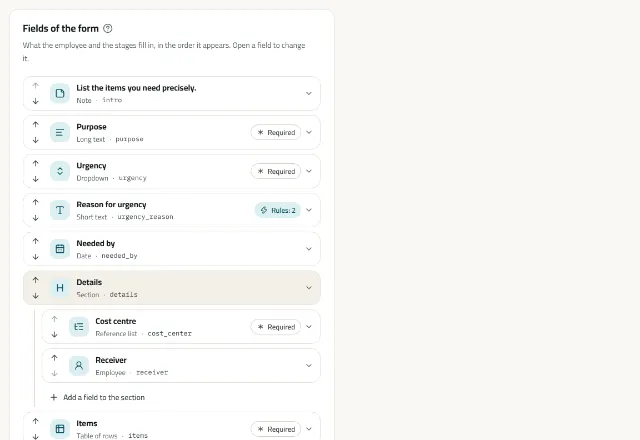
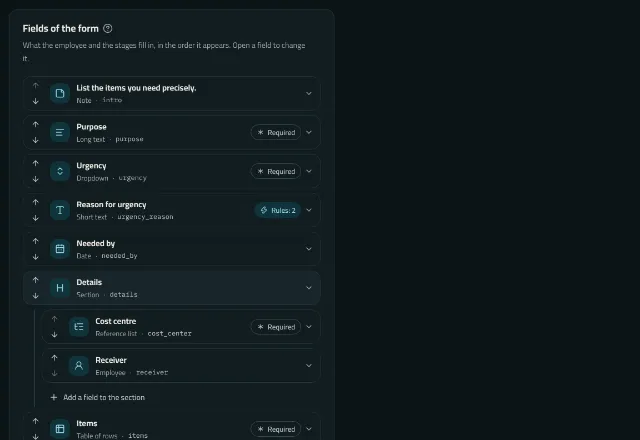
Forms are built field by field, with a live preview beside them that applies the rules as you type.
- Field types
- Short and long text; whole number, decimal and amount; date, time, and date and time; dropdown, multiple choice, radio buttons, yes or no, and checkbox; employee, organisational unit and reference list; files; a table of rows; a calculated field; sections and notes.
- Rules in a safe language
- Show, hide, require or lock a field, or check its value, on conditions about the form's answers or the person asking. Rules are a closed JSON structure that runs no code, and the server, the web and the phone evaluate them to the same result.
- Hidden values never count
- A value a rule hid is discarded on the server, so it can neither steer the workflow nor be stored.
- Cascading reference lists
- Lists you keep or import from Excel, such as cost centres and items, and lists that follow another's choice. The server checks every choice against its list.
- Line items and totals
- A table of rows with fields of their own, and sums and counts that calculated fields and routing conditions can use.
- File fields
- Allowed kinds and sizes per field, photos from the camera on the phone, and every file checked before it is kept.
- Default values
- A field starts with a fixed value or a fact the system knows: the employee's name, number, unit, position, grade, branch, manager, email, mobile or hire date, or today's date, the month or the year. The preview shows the designer how the form looks for an employee they pick.
- Fields the system fills, which cannot be forged
- A field the system fills is shown to the employee and cannot be changed: the server writes its value at every save and at submission, whatever was sent. After submission it stays as it was on the day the request was sent, and is marked “Filled automatically” on the request and its printout.
- Fields per stage
- A matrix sets what each stage sees, may edit and must fill in, such as the storekeeper recording the quantity issued.
- Sensitive fields
- A sensitive field is shown only to people explicitly allowed to see it, and never leaves through integrations.
- An explanation for every field
- Each field can carry an explanation in Arabic and English, which the employee reads by pressing the “?” beside its name, on the web and the phone.
Workflow designer
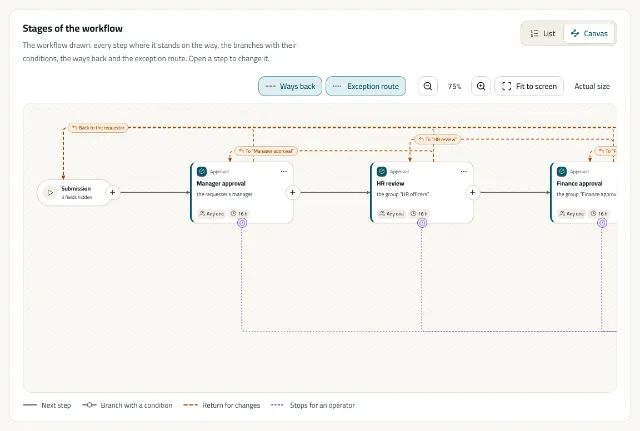
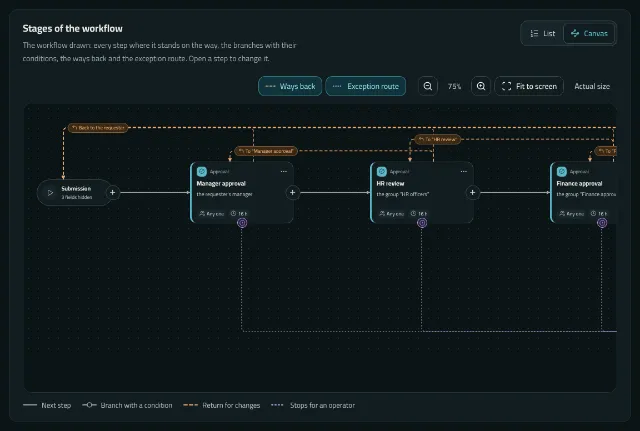
Each service's workflow is a graph of stages and transitions, shown as a list or as a canvas, with no limit on the number of stages or approvers.
- A visual canvas
- The workflow drawn in the reading direction: the main path straight, branches with their conditions, the ways back above and the exception route below. Zoom and pan with the mouse or the keyboard; nothing needs dragging.
- Kinds of stage
- An approval; a task to carry out, such as issuing goods or fixing a fault; and an automated step that notifies people, or calls another system and waits for its answer.
- Who decides
- The requester's manager, the manager of a unit, the holder of a position, the members of a group, named employees, or the employee chosen in a field of the form, with backups, delegations and absences taken into account.
- Approval modes
- Any one of them, all of them, or a quorum: a set number of different people out of those asked.
- Parallel branches
- Open a block of branches that run at once, such as HR and finance at the same time, meeting where every branch entered has finished. A branch can carry a condition, and blocks can nest.
- Conditional routing
- Transitions on conditions about the request, such as an amount above a threshold, written in the same rule language as the form.
- Returns for correction
- A request goes back to its requester or to an earlier stage with a reason. After the correction it starts again from the first stage, goes back to the stage that returned it, or goes back unless chosen fields changed.
- Nothing skipped silently
- A stage with nobody to decide stops in Exception for an operator. It is never skipped.
- Passing a task on
- Where the stage allows it, an approver passes a task to a colleague with a reason, and an administrator can reassign it.
- Simulate before you publish
- Choose an employee and the request's data, and see the path it would take and who would decide at each stage, drawn on the canvas.
- Self-approval and repeated approvers
- Rules that keep people from approving their own requests, and decide what happens when the same person appears at consecutive stages.
Access control
Layered access: administrative roles with a scope, rules for each service, and authority over a task that comes from the workflow. Every decision is made by the server.
- Allow and deny rules
- For each service: who sees it, who requests it, who requests it for others, who reads other people's requests. A rule targets an employee, a position, a group, a unit, a grade or a branch. The most specific rule wins, deny wins a tie, and what no rule allows is refused.
- Permission bundles
- Ready sets of actions granted together, instead of listing them in every rule.
- Access simulator
- Ask whether an employee may do something on a service, and the answer names the rule that decided it.
- The API decides
- The screens hide what you may not do, but the server rules on every call, and a record you may not see is answered as not found.
- Scoped administrative roles
- Built-in or custom roles, limited to a unit or a branch, and nobody can grant more authority than they hold.
- Comments at two levels
- Comments the requester sees, and internal ones for the people deciding.
Requests and approvals
The daily work of employees, approvers and managers, on the web and the phone.
- My Requests
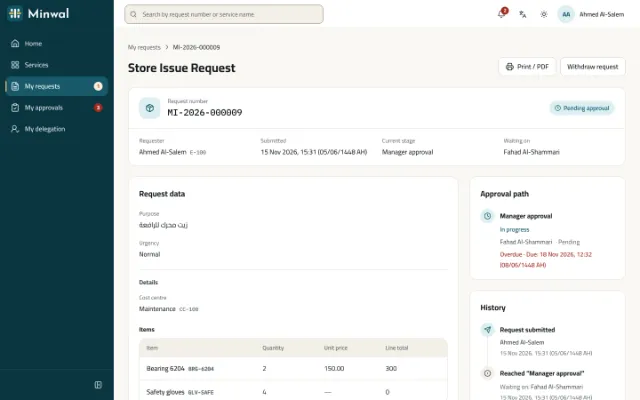
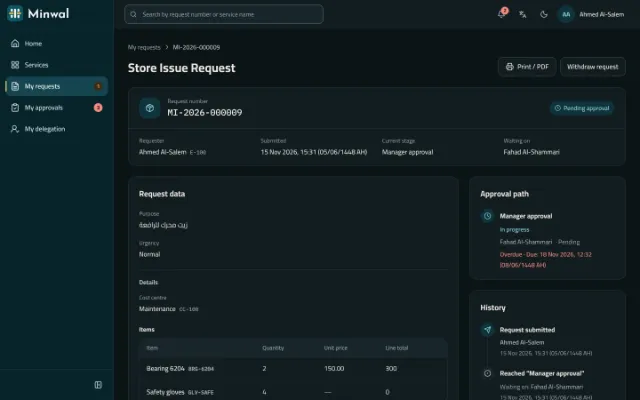
- In progress, returned, drafts and finished, narrowed by number, service, state and the days it was sent, in the order you choose. Save a draft and finish it later, withdraw a request, or correct a returned one and send it again.
- My Approvals
- One inbox across every service, with what you decided before. Narrow it by service, the requester's unit, priority, the days tasks reached you, or late only, and order it by deadline, oldest, newest or priority. The filters stay in the page's address, so you come back to the view you left.
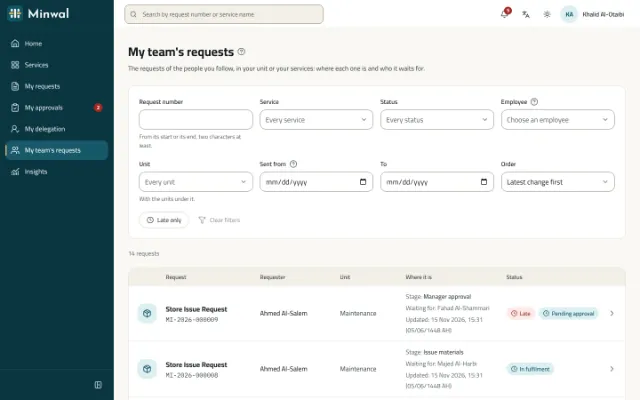
- My team's requests
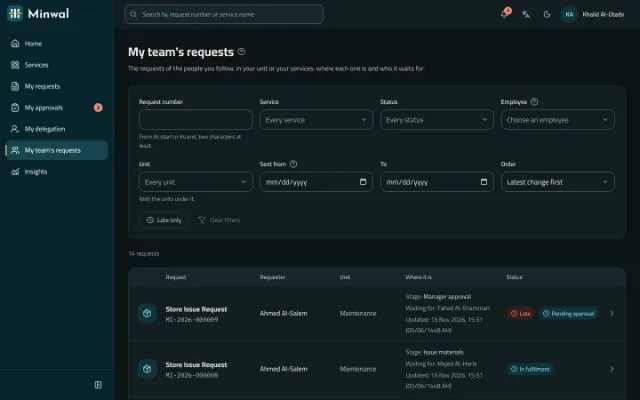
- For managers and anyone the access rules let follow a unit: its requests with who sent them, their unit, where they are and which are late, narrowed by number, service, unit, state, person and dates. For reading only, and no confidential request appears.
- Approving several at once
- Where the service allows it, several requests are approved together, each checked as if it were alone; one that cannot be is named with its reason and the rest go through. Rejecting and returning stay one at a time, each with its reason.
- Undo for a few seconds
- An approval waits five seconds before it is sent, with Undo and Send now, so a slip of the finger decides nothing. Returning and rejecting keep their own dialogs and reasons. After a decision, the next task is one press away.
- The decision after the data on a phone
- On a phone the decision panel comes after the request's data, so the approver reads before deciding, in the browser and in the app.
- Delegation
- Name a colleague to stand in while you are away, for every service or only some. A stand-in's approval counts for the person they stand in for, and the history says so.
- Requests for a colleague
- Where the service and your access allow it, submit a request for a colleague. The form and the workflow are worked out from their record, not yours.
- Copy as new
- From a request that is over, rejected, withdrawn, cancelled or completed, start a new draft with the values today's form still asks for. Files are not copied, the original is untouched, and the new request says which one it was copied from.
- Attachments from anyone along the path
- Each service sets its attachments policy: offered, required or off, how many and of which kinds. The requester adds them while the request is open, and approvers at stages that allow it or with their decision; the requester and the people deciding are told. Every file is scanned, named in the history and in the PDF, and never edited.
- Printable PDF with QR verification
- A request prints in its reader's language with only what they may see. Its QR code lets anyone check that the copy is genuine without revealing its data.
AI, on your terms
Two features that save time without taking a decision from anyone. Each organisation decides whether to use them, with which provider and with which key.
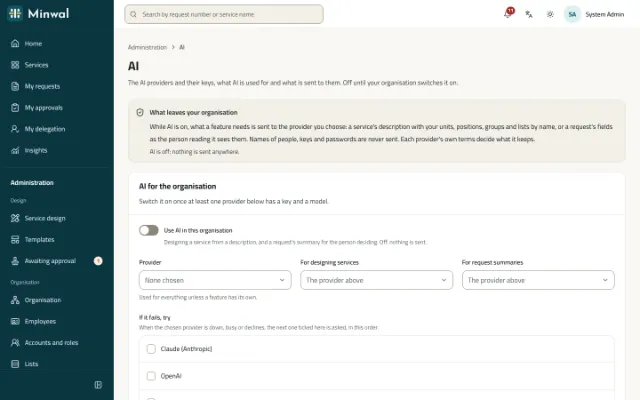
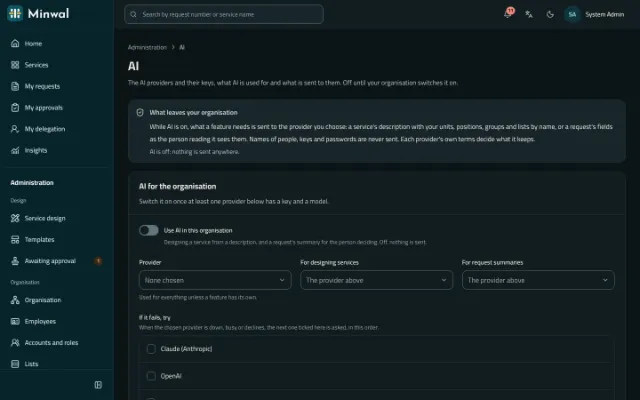
- Claude, OpenAI or Gemini, or several
- Choose one provider for everything or one per feature, and an order to try when one fails: if a provider is down, busy or declines, the next is asked, and the screen says what each one did.
- Off until you switch it on
- Nothing of it runs until the organisation's administrator switches it on, and it switches on only with a provider that has a key and a model. With it: a connection test, a daily limit on calls, and each provider's use this month.
- Design a service by describing it
- Write what you need in your own words, such as an advance the manager approves, then finance above a set amount, and get a draft service with its form, workflow and access rules, built from your own units, positions, groups and lists. Minwal checks every part with its own rules, and leaves out and lists whatever fails.
- A draft that never publishes itself
- What comes back is an ordinary draft marked “Designed with AI”. It goes through the designer, test mode and second approval like any service, and nothing of it reaches employees until a person publishes it.
- A summary for the person deciding
- A card on the request's page, on the web and the phone, for the person whose decision it waits for: asked for with one press, written in the reader's language from only what they can see, and labelled as made by AI and as advice that decides nothing.
- Checks worked out by Minwal, not the model
- Under the summary, checks the server works out itself: an amount above 90% of the service's recent requests, a file field left empty, a date before the day it was sent, an earlier return in its history. So the card never shows a warning a model made up.
- What is sent, and what never is
- For a draft: the service's description and the names and codes of the organisation's reference data. For a summary: the service's name, the request's state, its stage names and the fields its reader sees. Never a person's name, number or contact details, a key or a password, or anything of a confidential request while keeping them out is on.
- Keys encrypted, every call recorded
- Each provider's key is stored encrypted, and once saved only its last four characters are ever shown; it never enters a log or an error. Every call is recorded with its provider, model, duration and outcome, without its content, in the audit log.
- Can be taken out entirely
- On your own servers a key can come from the server's own configuration, or AI can be taken out of the installation altogether for an organisation that must keep everything on its premises: nothing of it is offered, and nothing is sent anywhere.
Deadlines and escalation
Every stage can have its deadline, counted in working time, and a plan for when it is missed.
- Deadlines on a business calendar
- A deadline counts working hours, working days and holidays, on the organisation's clock. A request on hold stops the clock.
- Reminders before and after
- An optional heads-up before a deadline, and a notice when it passes.
- Escalation in steps
- Hours after the deadline, as you set them: remind the holder, tell their manager, add the manager to decide in their place, add the stage's backups, or tell the operators. Escalation never decides for anyone and never skips a stage.
- Operations console
- Requests stopped in Exception, on hold and late, in one place, with manual assignment, hold and resume, and moving a request on under a permission of its own.
- Forgotten requests
- Reminders about drafts and returned requests left aside, then their cancellation or deletion, on limits the organisation sets.
- When someone leaves
- Their tasks go to their manager or stop for an operator, their delegations end and their account is closed.
Notifications
People hear about what concerns them, where they prefer to.
- In the app, by email and on the phone
- Every notification is listed in the app; email and push to the phone come with it, and each person can switch either off.
- In the recipient's language
- Each notification arrives in the language of the person who receives it.
- Everyone on the path is told
- When a request is submitted, everyone on its approval path is told that it is on its way to them.
- In your organisation's name
- Emails carry your organisation's name, logo and colour, and their links lead to your own address.
- When files are added
- The requester and the people deciding are told when someone adds files to a request; files added together make one notice. On a confidential request no file is named.
Insights and reports
Figures for the people who run the services, counted exactly as their access allows.
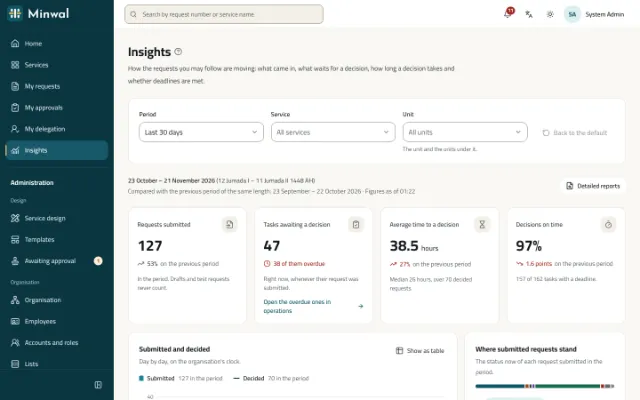
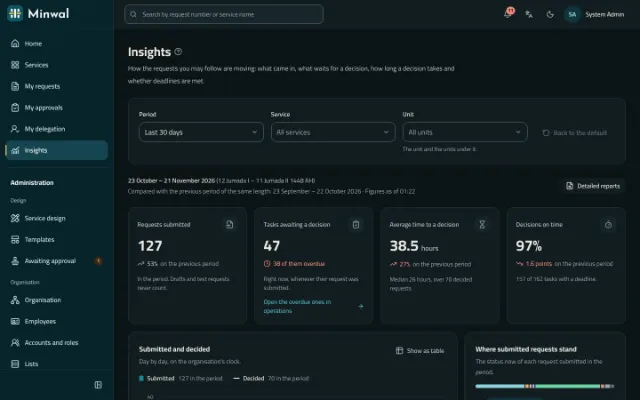
- Management dashboard
- Submitted and decided, what waits and what is late, the average and median time to decide, and the share of decisions on time, against the previous period, by service and by unit.
- Counts only what you may see
- The dashboard counts exactly what the reports may list for you, so its figures never reveal what access hides.
- Reports with the form's data
- Each service's requests, with its reportable fields as columns, filters, and export to Excel.
- Charts everyone can read
- The charts are read column by column from the keyboard, with a table beside them.
- A manager's summary on the phone
- The last 7, 30 or 90 days in four figures, what is open, and the busiest services.
Governance and audit
What happened, who did it and when, kept so that it can be trusted.
- A chained audit trail
- Every action goes into a log that is only ever added to, each event bound to the one before it by a hash, so any change shows, even one made directly in the database. The chain is verified in the background.
- A second approval for publishing
- When switched on, no form, workflow, release, access rule, package or template is published without the approval of someone other than the person who proposed it.
- Retention and legal holds
- Policies that remove the contents of closed requests or anonymise the people in them after a period you set, with a dry run before they are switched on, and legal holds that keep given requests out of their reach. Nothing is removed unless you switch a policy on.
- The organisation as it was
- A request keeps its requester's unit, manager and position as they were when it was submitted, so a later reorganisation never rewrites its history.
- A full history
- Every decision, comment, file and change on a request, with who made it and when, never edited.
- The audit log, from the record itself
- The audit log opens from a request, an employee, an account or a service on their own entries, narrows by person and by days, and says each action in words.
Integrations
Minwal works with the systems you already run.
- Signed webhooks
- Every change to a request is written to an outbox in the same transaction, sent within a minute signed with HMAC-SHA256, retried for about a day, and kept in a delivery log you can resend from.
- API clients with scoped keys
- Other systems read requests and the directory, and load employees and list items, each with only what its key is granted.
- OpenAPI 3.1
- The API's contract is one OpenAPI document, served by the API itself, and the tests hold every answer to it.
- Automated steps
- A stage that calls another system and waits for its answer before the request goes on.
Sign-in and the organisation
Every employee signs in the way that suits them, even without an email, and the structure that routes requests is your own.
- Sign in with an email, a mobile number or a username
- One sign-in box that reads what was typed, with the same limits and lockout for all three, on the web and the phone.
- Accounts for people without email
- For drivers, warehouse and field staff: the administrator gives a username and a password they type under the password policy, or a temporary one the system makes, changed at first sign-in. Someone with no email asks their administrator for a new password.
- Accounts for every employee at once
- An account for each active employee without one: an email invitation for those with an email, and a username from their employee number with a temporary password for those without, listed once only, with a CSV to hand them over.
- A sign-in made with the employee
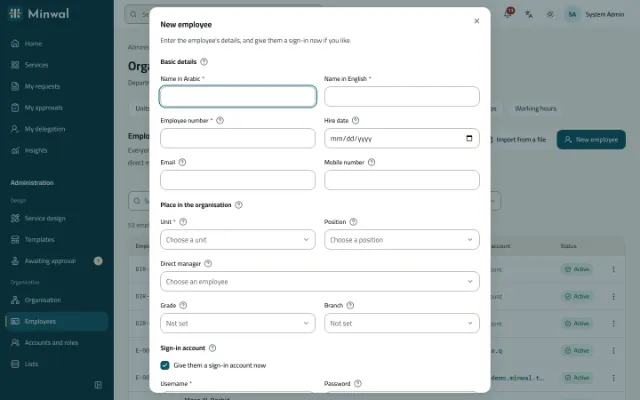
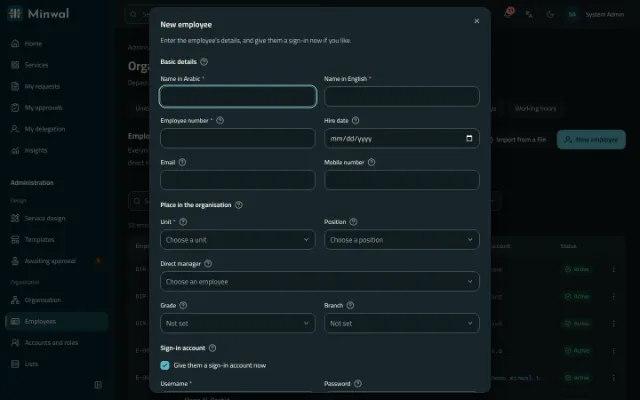
- The “New employee” dialog has a sign-in section: a username and a password, or an email invitation. The employees list shows each person's account and its state, and from there a password is changed or an account made for someone without one.
- Password and authenticator app
- Two-step sign-in with authenticator and recovery codes, which the organisation can require of administrators. Accounts lock after repeated wrong passwords.
- Single sign-on with OpenID Connect
- Through your own identity provider, on the web and on the phone. Passwords can be kept for administrators only.
- Active Directory and LDAP sync
- Read only, over an encrypted connection: it creates and updates employees, and ends those who have left, within limits you set.
- Codes by SMS
- Sign-in with a mobile number and a one-time code, through the SMS gateway you choose.
- A real organisation structure
- A tree of units, with branches, positions, grades, groups, direct managers and more than one assignment per person, named in Arabic and English; entered by hand, from Excel or from the directory.
Easy to run
Minwal tells the people who run it what to do next and where, so their first day needs no manual.
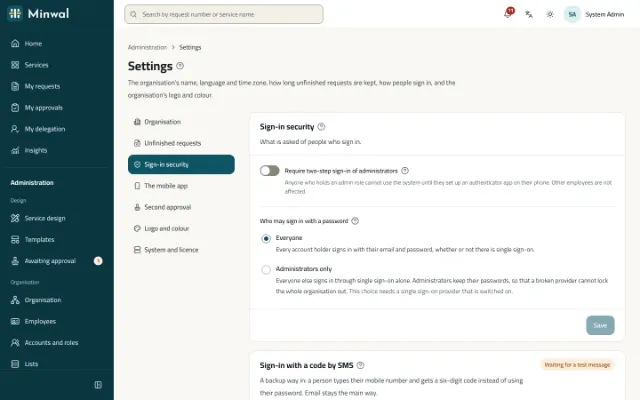
- A “?” beside every field
- Every field, setting and section that needs explaining has a “?” that explains it in a sentence or two and an example, in Arabic and English, on the web and the phone, with the keyboard and screen readers. Every page has its own, saying where to start.
- A first-day checklist
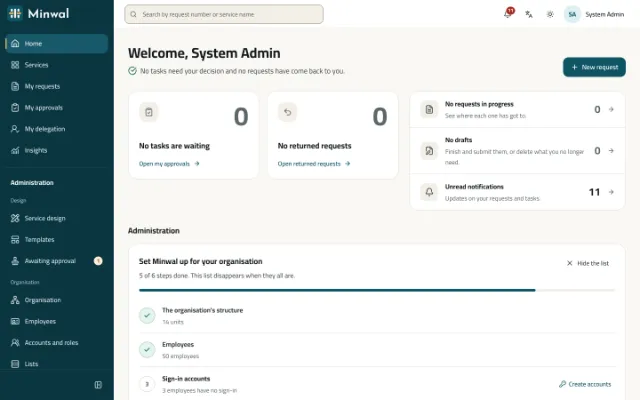
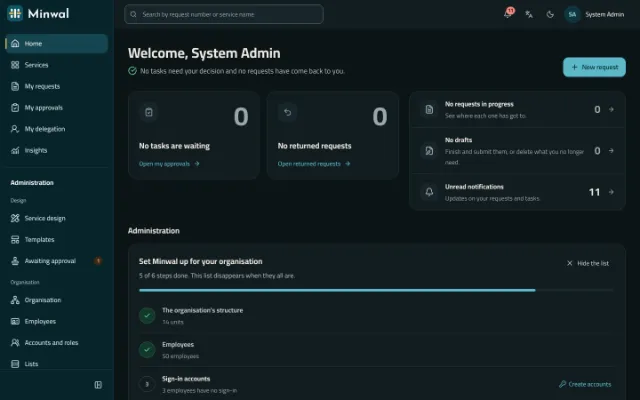
- Six steps the system counts for a new organisation: units, employees, people with no sign-in, groups that services route to with nobody in them, services never released, and a trial run. Each has its count and a link to where it is done, and the list goes away once complete.
- An administrator's home
- A section “For administration” at the top of the home page: stopped requests, late ones and changes waiting for their approval, each with its count and its link. The number of stopped requests also shows beside Operations in the sidebar.
- From a stopped request straight to the stage
- On a stopped request's page: open it in Operations, edit the stage it stopped at in the service's workflow, or read its audit log. The notice operators receive opens it in Operations directly.
- Move an employee or change their manager on screen
- From the employees list or the employee's record: unit, branch, position, grade and manager, with a reason, all in the audit log. A manager who reports to the person is refused. New requests follow the new structure; those already sent keep theirs.
- Imports from Excel
- Employees and list items from an Excel or CSV file, with a check that shows what would change first. Each list downloads as an Excel sheet with Arabic headings and its current items, to correct and load back.
- Settings in clear groups
- The organisation, unfinished requests, sign-in security, the mobile app, a second approval, the logo and colour, and the system and licence: one group shown at a time, each saved on its own and with its own link.
- Records that lead to each other
- From an employee to their requests and audit entries, from a service to its requests, report and insights, from a group to the services that use it, with a warning when nobody is in it.
Arabic first, open to everyone
A product designed for Arabic from the first screen, and for everyone who uses it.
- Designed right to left
- Arabic is the first language and the interface was designed for it, then checked in English. Each person chooses their own language.
- Hijri dates beside Gregorian
- Dates follow the organisation's clock, with the Hijri date (Umm al-Qura) beside them when the organisation asks for it.
- Saudi defaults
- Riyadh time, the riyal and a Sunday to Thursday week, each of them changeable.
- WCAG 2.2 AA
- The web app is held to WCAG 2.2 AA and reviewed screen by screen in both languages and both themes, at desktop and phone width: contrast, a visible focus, and the keyboard everywhere, with no dragging required.
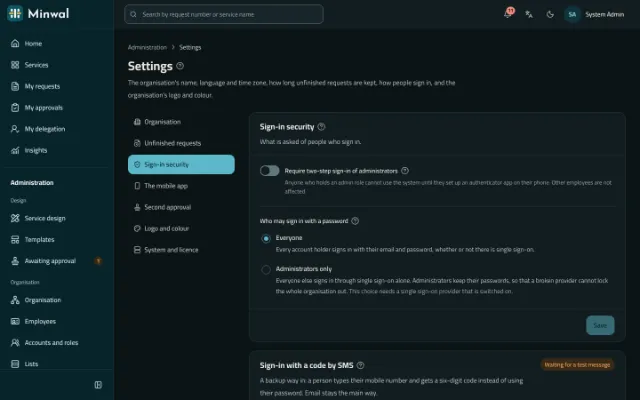
- Light and dark
- Two themes from the first release, kept for each person.
- Your brand
- Your logo and colour on the screens, the emails and the PDFs, while the colours of request states stay the same for everyone.
The same features, applied to your requests
Read how these features work together on the requests organisations handle most.
Leave and attendance permission requests
Leave and attendance permission requests from the web or the phone, approved by the direct manager and reviewed by HR, with a clear deadline at every stage.
Purchase requisition approval software
A purchase requisition with its items, estimated cost and cost centre, approved by the manager, then finance and senior management by amount, and carried out by procurement.
Expense claim and salary advance approvals
Expense claims with their receipts, and salary advances with their instalments, approved by the manager, then HR and finance side by side before payment.
Store issue and asset custody requests
A store issue request with its items and quantities, and an asset custody request handed over with the asset number and a signed form, each with a clear approval path.
IT support and maintenance request system
IT fault reports and access requests, and maintenance requests for the building and equipment, straight to the right team with a deadline, an urgency and photos.
Employee self-service for government
Employee self-service in Arabic first, with Hijri dates, on the organisation's own servers even without internet access, with Active Directory and a hash-chained audit trail.
And beyond the browser
Mobile app
Android and iOS, for employees and approvers, with offline drafts and an app lock.
Deployment
Self-hosted, even without internet access, or in the cloud, from the same code.
See Minwal with services like your own
We will show you the product on services like yours, and answer the questions of your HR, IT and security teams.
Request a demo